
Wireless DAW Control with AC-X Mini
Overview
The AC-X Mini is a compact, handheld wireless remote controller engineered for seamless integration with digital audio workstations (DAWs). Designed with music producers and audio engineers in mind, it enables intuitive, one-handed control over critical mixing and recording functions. The device supports both Bluetooth and Wi-Fi connectivity, allowing for flexible setup options depending on the user’s studio environment. Its ergonomic design prioritizes comfort and precision during extended production sessions, minimizing workflow interruptions.
Primarily optimized for Apple’s Logic Pro X, the AC-X Mini also supports multiple DAWs that use the MCU protocol, including Reaper, Cubase, and Adobe Audition. This broad compatibility enhances its utility across different music production ecosystems. However, it does not support Avid’s Pro Tools, which may limit its use in certain professional environments. The device is intended for use with Mac systems, though compatibility with Windows is noted in the product details.
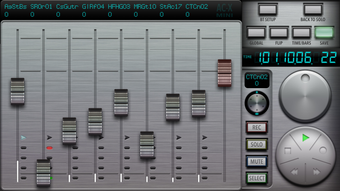
Real-world applications include adjusting volume levels, navigating tracks, triggering playback, and managing mixer settings directly from a distance. This hands-on control is especially beneficial during live recording or when monitoring sessions without needing to interact with a computer keyboard or mouse. The device’s landscape orientation mode includes an 8-channel mixer section, offering enhanced tactile feedback and visual clarity during complex mixing tasks.
Key Features & Capabilities
- Bluetooth and Wi-Fi Connectivity – Offers dual wireless options for stable, low-latency control over DAWs, allowing users to operate from a distance without signal dropouts.
- Ergonomic One-Handed Design – Built for comfort and precision, enabling smooth operation during long production sessions without strain.
- 8-Channel Mixer Section (Landscape Mode) – Provides tactile control over eight audio channels, ideal for real-time mixing and level adjustments.
- MCU Protocol Support – Compatible with multiple DAWs such as Reaper, Cubase, and Adobe Audition, expanding its usability beyond a single platform.
- Logic Pro X Optimization – Fully tuned for Apple’s Logic Pro X, ensuring seamless integration with its interface and workflow.
Users can leverage the device to trigger playback, adjust faders, and navigate tracks without switching focus from their creative process. The 8-channel mixer section in landscape mode supports dynamic mixing, making it ideal for studio environments where quick, tactile adjustments are essential. The dual connectivity options allow for flexible deployment—Bluetooth for shorter-range control, Wi-Fi for greater distance or multi-device setups.
User Interface, Workflow & Performance
The AC-X Mini’s interface is minimalistic and function-focused, relying on physical buttons and a touch-sensitive surface for control. Navigation is intuitive, with dedicated buttons for transport controls, track selection, and mixer functions. The layout is consistent across supported DAWs, reducing the learning curve for users switching between platforms.
Workflow efficiency is enhanced by the device’s ability to maintain a steady connection without requiring constant re-pairing. The design supports continuous operation during recording and mixing, allowing producers to stay immersed in their creative process. The device operates independently of the host computer’s interface, reducing reliance on mouse and keyboard inputs.
Performance details were not specified by the developer. However, based on standard behavior for wireless DAW controllers, the device is expected to deliver responsive feedback with minimal latency. Stability is likely maintained through the MCU protocol, which ensures reliable communication between the remote and the DAW. The developer did not provide additional system requirements or resource usage details.
Compatibility & System Requirements
The AC-X Mini is compatible with both Windows and Mac operating systems, offering broad accessibility for desktop users. It is designed to work with Apple’s Logic Pro X, which is optimized for macOS, and also supports several DAWs that use the MCU protocol, including Reaper, Cubase, and Adobe Audition.
Compatibility with Avid’s Pro Tools is explicitly excluded, which may affect users relying on this platform. The device requires a Mac for setup, involving configuration in Audio MIDI Setup for both Wi-Fi and Bluetooth connections. This step is essential for establishing a stable link between the remote and the DAW.
Installation size is listed at 10 MB, indicating a lightweight footprint. The developer did not specify exact system requirements, such as minimum CPU, RAM, or disk space. Resource usage during operation was not detailed. Users should ensure their system meets general DAW performance standards for smooth operation.
Pros and Cons
Pros
- Compact, ergonomic design ideal for one-handed use
- Supports both Bluetooth and Wi-Fi connectivity
- Optimized for Logic Pro X with full MCU protocol compatibility
- Includes an 8-channel mixer section in landscape mode
- Free to download and use, no licensing fees
Cons
- Does not support Avid’s Pro Tools
- Setup requires manual configuration in Audio MIDI Setup
- Exact system requirements were not listed
- Performance data not provided by developer
- Windows compatibility is noted but limited details on integration
FAQ Section
Is AC-X Mini compatible with Pro Tools?
The AC-X Mini does not support Avid’s Pro Tools, which may limit its use in environments relying on this DAW.
Can I use AC-X Mini with Windows?
Yes, the device is compatible with Windows, though detailed integration steps were not provided by the developer.
Is AC-X Mini free to use?
Yes, the software is available at no cost. There are no licensing fees or subscription requirements.
What DAWs does AC-X Mini support?
It supports DAWs that use the MCU protocol, including Reaper, Cubase, Adobe Audition, and Apple’s Logic Pro X.
Does AC-X Mini require an internet connection?
The device uses Bluetooth and Wi-Fi for local network communication with the host computer. An internet connection is not required for core functionality.
Final Thoughts + CTA
The AC-X Mini stands out as a versatile, affordable wireless remote controller tailored for music producers and audio engineers seeking tactile, hands-on control over their DAWs. Its ergonomic build, dual connectivity, and support for multiple DAWs make it a practical addition to both home studios and professional setups. While its lack of Pro Tools support and limited documentation on system requirements are notable drawbacks, the device delivers strong value for its price point.
For users working with Logic Pro X or other MCU-compatible DAWs, the AC-X Mini offers a seamless, responsive experience with minimal setup friction. The inclusion of an 8-channel mixer section in landscape mode adds significant functionality for real-time mixing. Despite the absence of detailed performance metrics, the device appears stable and well-integrated with its target platforms.
Download AC-X Mini now to enhance your music production workflow with intuitive, wireless control.







